Googlebot crawls in two waves. The first wave processes raw HTML. JavaScript is queued for a second wave — which can happen seconds, hours, or days later. Content, links, and directives that only exist after JavaScript renders may be invisible to Google on the first crawl, and always add latency to indexation.
How Google processes JavaScript
Google provides a great workflow of how they process JavaScript.
- A URL is added to the Crawl Queue
- Googlebot fetches the URL and uses a HTTP request to see if crawling is allowed - checks robots.txt and header for noindex tags
- During processing links are extracted to add to the crawl queue and content is processed through to index
- The page is added to the rendering queue which could take sometime to get through to rendering
- The Rendered HTML is then processed as well with links extracted and added to the crawl queue
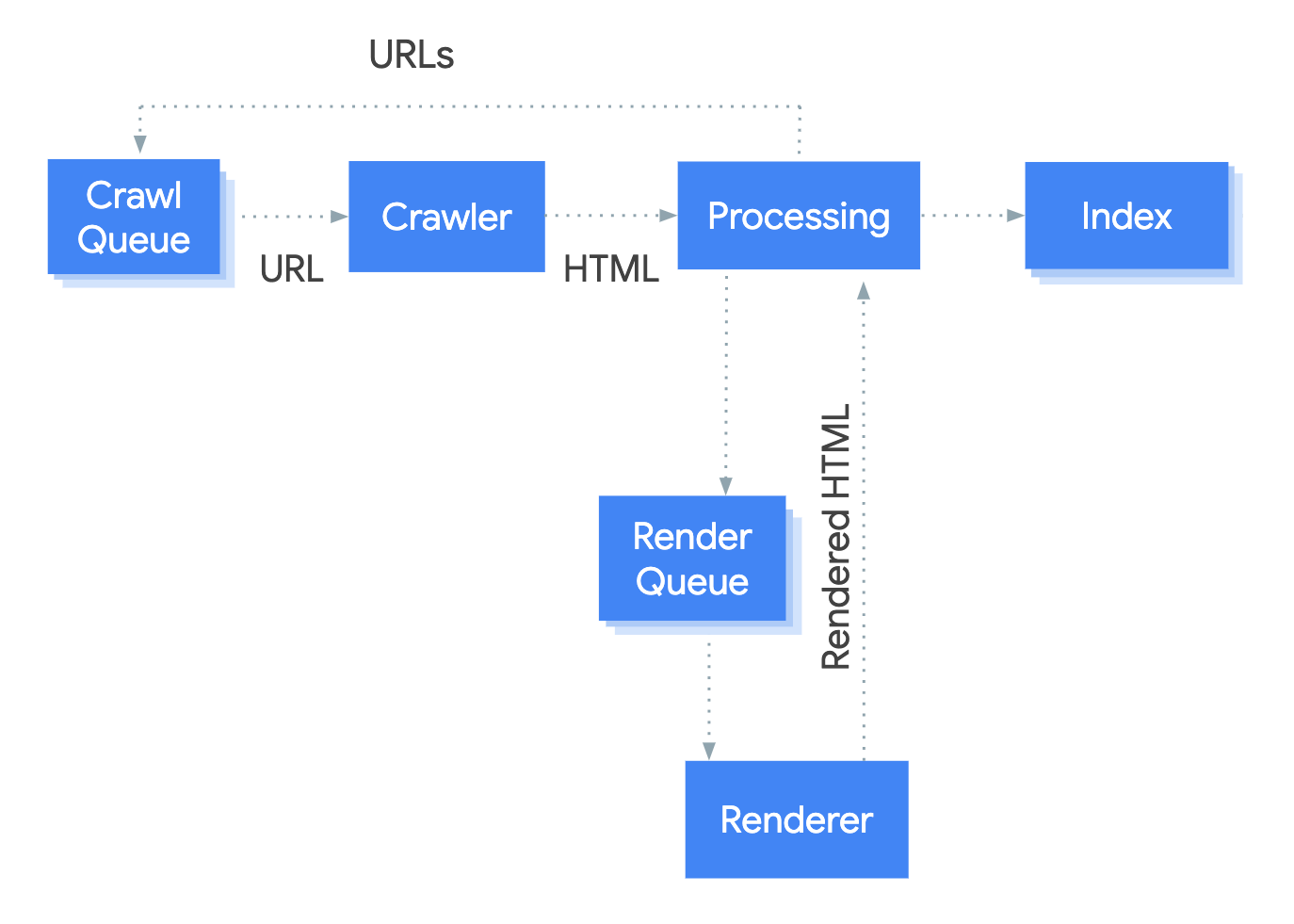
Search engines see pages differently from a browser. And I like to think of it in terms of different waves of Google processing the page:
Wave 1 - HTML
When Googlebot crawls a URL, it fetches the raw HTML first. At this point it processes everything it can read from the source code: titles, meta tags, canonicals, body text, and internal links. JavaScript execution does not happen yet.
Wave 2 - Rendered JavaScript
Google will then wait for the page to get through the rendering queue before rendering the pages JavaScript. This could take seconds to days depending on crawl budget and queue depth.
This is why if you have content that's only loaded through JavaScript you won't see the change as quickly
When people regularly whinge about how long its taking Google to index their content, I often wonder if its more about how much of their website is Client Side Rendered
The practical implication: any SEO-critical signal that exists only after JavaScript runs is unreliable, delayed, or invisible. “It looks fine in the browser” is not a reliable SEO signal.
What your Source Code should look like:
When you check your view-source on by right clicking > "View page source" you should see all the content you want Google to see. For example — all critical content in raw HTML:
<!-- Correct: all SEO-critical content in raw HTML -->
<head>
  <title>Page Title — Sally Mills</title>
  <meta name="description" content="Description.">
  <link rel="canonical" href="https://sallymills.com/page/">
</head>
<body>
  <h1>Page heading</h1>
  <p>Body content — not rendered by JavaScript.</p>
  <a href="/other-page/">Internal link</a>
</body>
Live examples
Each page below is a real, crawlable demo. The rendering behaviour is live — search engines encounters exactly what's described.
Server-Side Rendered
Full content in raw HTML. Title, meta, canonical, H1, body, and internal links all present at first fetch. The baseline correct approach.
View demo → 🔴 IssueClient-Side Rendered
Article content rendered by JavaScript only. Raw HTML contains a near-empty body. Wave 1 crawl sees essentially nothing.
View demo → ⚠️ Partial issueMixed Rendering
H1 and meta in HTML. Body content and internal links added by JavaScript. Common in partially server-rendered frameworks.
View demo → 🔴 IssueLinks Loaded via JavaScript
Page content is in HTML but all internal links are injected by JavaScript. No <a href> tags in the article content in raw source.
Interaction-Gated Content
Two accordions: one hides content with CSS (Google sees it), one injects content on click (Google doesn't). The difference between collapsing content and gating it.
View demo → 🔴 Issuenoindex Loaded via JavaScript
The noindex meta tag is injected by JavaScript. Not in raw HTML. Wave 1 may index the page before Wave 2 sees the directive.