Talk recorded at Sydney SEO Conference 2025
Recently, I had the opportunity to speak at the Sydney SEO Conference in 2025. Over the past couple of years, I haven't met many SEOs who have explored and understood bots and log files. So let's dig in and hopefully, I can help!
Is Dead Internet Theory true yet?
Have you heard of the Dead Internet Theory? It's a conspiracy theory that the internet will one day mainly consist of bots and automated-generated content. Currently, it's feeling less like a conspiracy theory and more like truth. If you've been on social media lately you'll have noticed an increase in bots and less real life.
So how are we tracking? Imperva released a solid report called the Bad Bot Report which as of 2023 puts bots at 50% of traffic on the internet.
Good Bots — allow online businesses and products to be found by prospective customers, with examples including search engine crawlers like Googlebot and Bingbot.
Bad Bots — web scraping, competitive data mining, personal and financial data harvesting, brute-force login, digital ad fraud, spam, transaction fraud, and more.
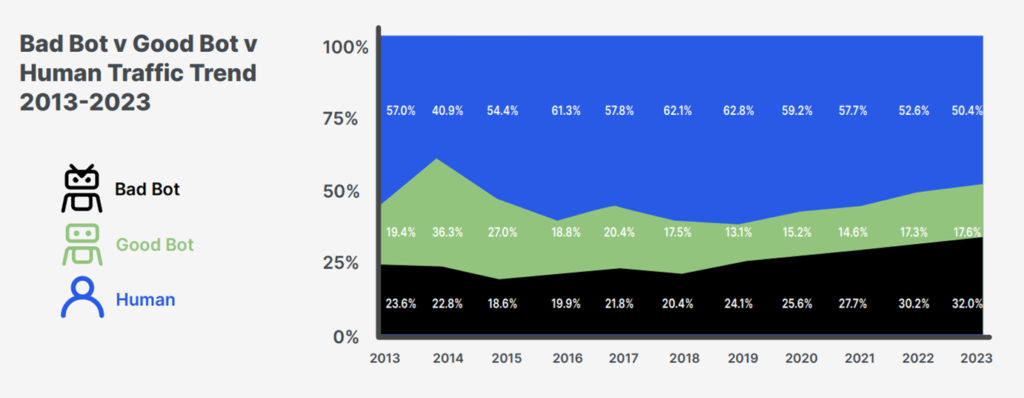
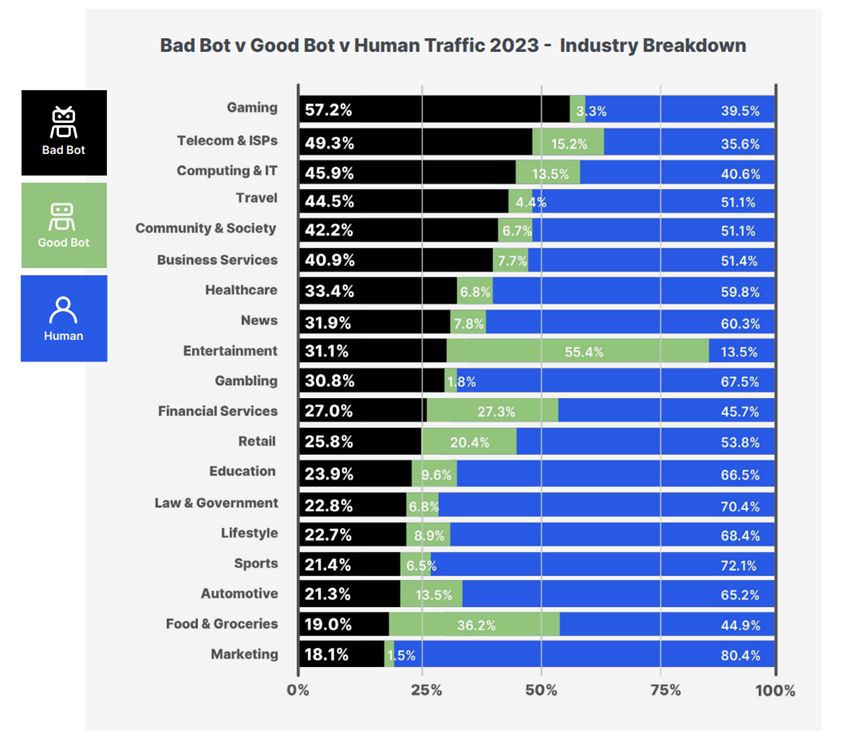
It's important to remember this varies by industry, with Gaming seeing the largest number of "bad bots". Imperva's report includes some fascinating numbers including cheating in gaming or seat spinning in the travel industry.
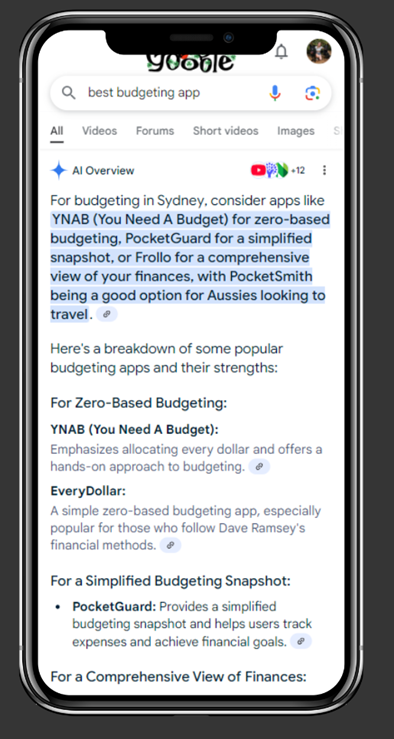
So what does this have to do with SEO and log files? SEOs love to say we're optimising for the user. And for the most part, we are. We know from Google's anti-trust trial they use click data to rank websites. However, with the increase in zero-click searches, AI Overviews, and the rise of AI alternatives, we need to start keeping an eye on bots.
What are bots doing on my websites?
To help the Sydney SEO community understand log files and bots, I've used two of my hobby sites — Dog Games and Safe Suburbs — to illustrate what you can discover in log files. Here are some statistics for January:
| Website Details | Dog Games | Safe Suburbs |
|---|---|---|
| Website Type | Ecommerce | Programmatic |
| URLs (HTML, JS, CSS, Images) | 700 | 419 |
| HTML Pages | 121 | 372 |
| Monthly Users | 1,800 | 1,000 |
| Organic Audience | Dog enrichment toy keywords | Programmatic, long tail, crime statistic keywords |
| Number of Logs | 120,000 | 33,000 |
What is a log file?
Every time a user or bot (a client) loads your website — whether it's a page, image, JavaScript, or CSS file — they leave a trace in the form of a log. When we talk about log files in SEO, we're talking about access logs. These will usually be in an Apache or Nginx format.
A log file looks similar to the below, with a range of different user agents, pages, IPs, and timestamps. We can use these files to find errors or information about what bots or users are experiencing on our websites.
66.249.68.68 - - [01/Feb/2025:04:57:22 +0000] "GET /slow-feeders/ HTTP/1.1" 200 26091 "-" "Mozilla/5.0 (compatible; Googlebot/2.1; +http://www.google.com/bot.html)"

40.77.167.1 - - [01/Feb/2025:06:17:50 +0000] "GET /slow-feeders/ HTTP/1.1" 301 306 "-" "Mozilla/5.0 AppleWebKit/537.36 (KHTML, like Gecko; compatible; bingbot/2.0; +http://www.bing.com/bingbot.htm) Chrome/116.0.1938.76 Safari/537.36"

38.18.17.226 - - [01/Feb/2025:06:23:27 +0000] "GET /slow-feeders/ HTTP/1.1" 200 172784 "-" "Mozilla/5.0 AppleWebKit/537.36 (KHTML, like Gecko; compatible; PerplexityBot/1.0; +https://perplexity.ai/perplexitybot)"

51.222.253.4 - - [01/Feb/2025:09:14:15 +0000] "GET /slow-feeders/ HTTP/1.0" 200 172503 "-" "Mozilla/5.0 (compatible; AhrefsBot/7.0; +http://ahrefs.com/robot/)"

72.14.201.175 - - [01/Feb/2025:15:18:14 +0000] "GET /slow-feeders/ HTTP/1.1" 200 172804 "https://www.google.com/" "Mozilla/5.0 (Linux; Android 10; K) AppleWebKit/537.36 (KHTML, like Gecko) Chrome/132.0.0.0 Mobile Safari/537.36"
Where to find log files?
If you have an infrastructure or IT team, they can usually get them off your server or CDN such as Cloudflare. Make sure to ask for access logs specifically — not log files in general, as servers hold a number of different logs including error logs and plugin logs.
If you're working on massive websites, there's a chance they're not storing access logs. For very large sites it can be expensive to store them.
Finding log files on your own server
If you're hosting your own sites, you can usually find them through FTP or your server's file manager — typically in a folder called logs. If they're not there, reach out to your hosting company and ask if they can be stored for you.
Honestly, finding your log files is the hardest part of log file analysis.
How to read an Apache or Nginx log
Let's use this log as an example:
66.249.68.68 - - [01/Feb/2025:04:57:22 +0000] "GET /slow-feeders/ HTTP/1.1" 200 26091 "/dog-puzzles/" "Mozilla/5.0 (compatible; Googlebot/2.1; +http://www.google.com/bot.html)"IP Address of the client: 66.249.68.68
The IP of the client (bot or user) that hit your website. Most "good" bots maintain a consistent set of IP addresses. In the example above, 66.249.68.68 is one of Googlebot's IPs, which can be verified in their crawler lists.
Date & Time of the Request: [01/Feb/2025:04:57:22 +0000]
Straightforward — the date and time the client hit the URL. Make sure to check which timezone the server is logging in and convert to yours.
Request Type & URL Path: GET /slow-feeders/
Here we can see what URL the client is hitting. GET means the client is retrieving data from the server. You'll also see POST in log files when the server is posting data.
The URL can include parameters, which is incredibly helpful for finding issues. Below, Googlebot is regularly crawling URLs that include Add to Cart parameters — creating thousands of unique URLs. This error can also be found in Google Search Console.
66.249.65.203 - - [31/Dec/2024:23:29:07 +1100] "GET /brands/west-paw/rumbl-treat-dispensing-dog-toy/?add-to-cart=356 HTTP/1.1" 200 34402 "-" "Mozilla/5.0 (Linux; Android 6.0.1; Nexus 5X Build/MMB29P) AppleWebKit/537.36 (KHTML, like Gecko) Chrome/131.0.6778.139 Mobile Safari/537.36 (compatible; Googlebot/2.1; +http://www.google.com/bot.html)"Protocol: HTTP/1.1
The HTTP protocol the client used. In most cases it will be HTTP/1.1. You may be familiar with HTTP/2 from site speed work — it's faster and more efficient.
Status Codes: 200, 3xx, 4xx, 5xx
You should be familiar with this one. It's the status code the server responded with.
301 Redirect example — A 301 log for Googlebot hitting an old page. I know there are no internal links pointing to this URL and I redirected it back in May 2024.
Please keep your 301s in place. I've worked on many old websites and Googlebot will continue to crawl them. There could be old backlinks out on the web you don't know about.
66.249.65.202 - - [05/Jan/2025:03:24:50 +1100] "GET /tug-toys/ HTTP/1.1" 301 0 "-" "Mozilla/5.0 (Linux; Android 6.0.1; Nexus 5X Build/MMB29P) AppleWebKit/537.36 (KHTML, like Gecko) Chrome/131.0.6778.139 Mobile Safari/537.36 (compatible; Googlebot/2.1; +http://www.google.com/bot.html)"404 example — GPT hitting a 404. Googlebot and Bingbot were hitting this URL too. Sometimes a crawl won't pick up all 404 errors — you may have an unlinked page you've forgotten about.
4.227.36.126 - - [02/Jan/2025:12:53:21 +1100] "GET /buster/ HTTP/1.1" 404 17792 "-" "Mozilla/5.0 AppleWebKit/537.36 (KHTML, like Gecko; compatible; GPTBot/1.2; +https://openai.com/gptbot)"Total Bytes: 26091
Another data point for site speed. Total Bytes tells you the size of the request — a great way to discover URLs or code files that are too large.
HTTP Referrer: /dog-puzzles/
Some logs include the URL path that referred the client, though this is often not included.
User Agent
The user agent tells you who the log is about. Most of the time it includes a URL where you can find out more about the bot and how to block it.
# Googlebot
"Mozilla/5.0 (compatible; Googlebot/2.1; +http://www.google.com/bot.html)"

# Bingbot
"Mozilla/5.0 AppleWebKit/537.36 (KHTML, like Gecko; compatible; bingbot/2.0; +http://www.bing.com/bingbot.htm) Chrome/116.0.1938.76 Safari/537.36"

# DuckDuckGo
"https://duckduckgo.com/" "Mozilla/5.0 (Android 15; Mobile; rv:133.0) Gecko/133.0 Firefox/133.0"

# OpenAI LLM Bot
"Mozilla/5.0 AppleWebKit/537.36 (KHTML, like Gecko; compatible; GPTBot/1.2; +https://openai.com/gptbot)"

# OpenAI Search Bot
"Mozilla/5.0 (Macintosh; Intel Mac OS X 10_15_7) AppleWebKit/537.36 (KHTML, like Gecko) Chrome/131.0.0.0 Safari/537.36; compatible; OAI-SearchBot/1.0; +https://openai.com/searchbot"

# Perplexity Bot
"Mozilla/5.0 AppleWebKit/537.36 (KHTML, like Gecko; compatible; PerplexityBot/1.0; +https://docs.perplexity.ai/docs/perplexity-bot)"
How to analyse this data?
For my analysis I used Screaming Frog Log File Analyser and also built a custom Python solution. You can discover which pages Googlebot or other bots are crawling too much or not enough, and what errors need fixing. It's really up to you to explore and dig into the data.
Are my websites dead yet?
I'm happy to say my websites still have users landing on them. The numbers are pretty close to Imperva's report though. Dog Games sees 56% users vs 43.5% bots. Safe Suburbs is different: 49.5% users vs 50.5% bots — though the site is quite out of date, it still ranks well.
Which bots are hitting my sites?
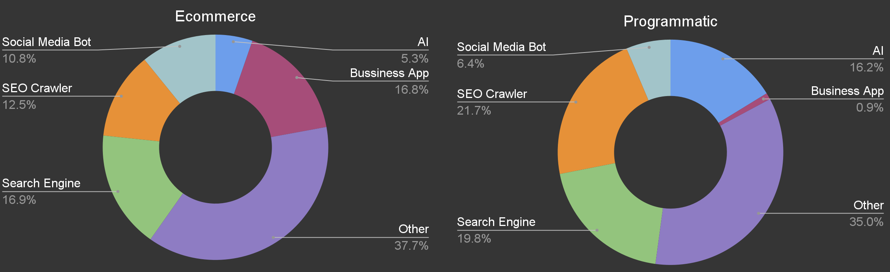
For this study I've categorised the more common bots and left others under "Other". There will always be a range of different bots hitting your site. "Business App" is 16.8% of bots on my e-commerce site — this includes operational or CRM bots communicating with the website.
Search Engines vs AI
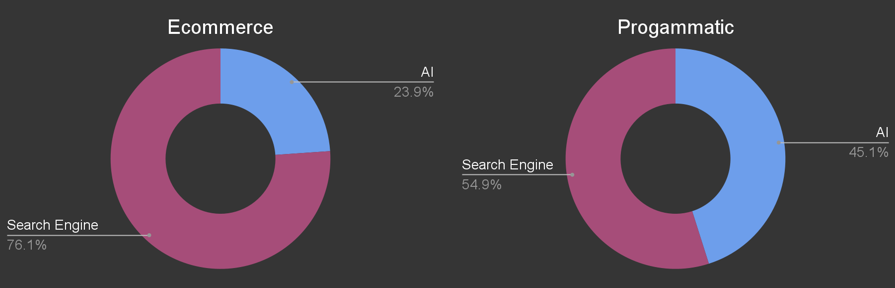
When looking at AI vs search engines, the two sites show very different numbers. Dog Games: AI 23.9% vs Search Engine 76.1%. Safe Suburbs: 54.9% search engine vs 45.1% AI.
AI bots show a preference for informational pages, which could explain more AI activity on the programmatic site (which has far more informational content than the e-commerce with only 6 blog posts).
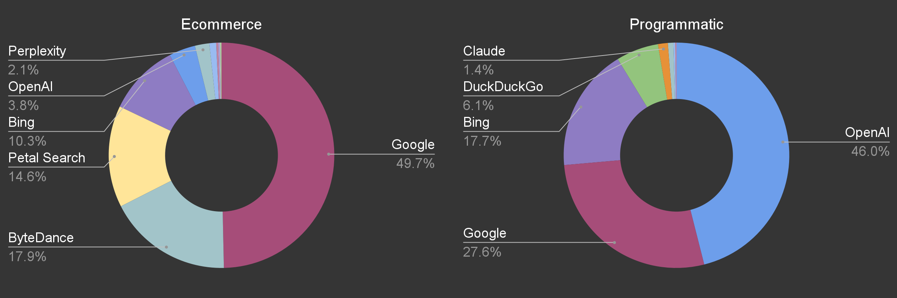
Breaking it down further, both sites have very different bots hitting them. OpenAI seems particularly interested in Safe Suburbs at 46% of all hits vs only 3.8% on Dog Games. Dog Games sees more Perplexity and Petal Search (used for Huawei devices).
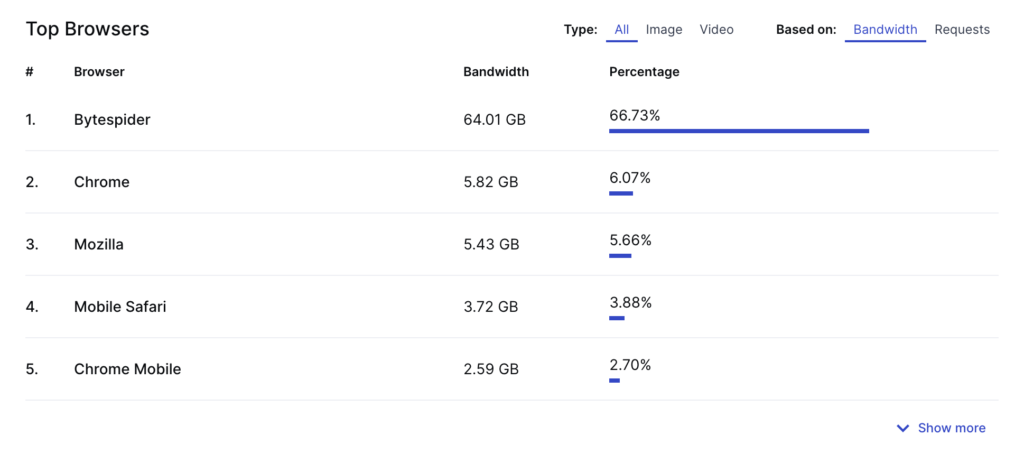
ByteDance is 17.9% on Dog Games, which is notable — ByteDance is the owner of TikTok and their bot (ByteSpider) is reportedly training Doubao.
SEO bots aren't really helping
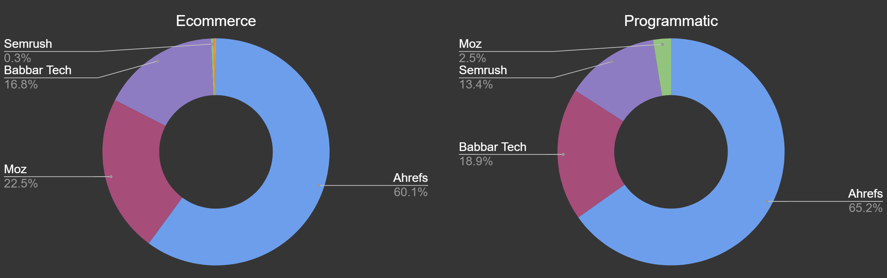
Our industry is behind an awful lot of bandwidth usage — which isn't great for the environment either. Ahrefs is the largest SEO bot, though it's worth noting this includes their search engine Yep and is listed on Cloudflare's verified bots along with Moz and Semrush.
Can we even block AI & SEO bots?
Yes — through your robots.txt, .htaccess, or CDN. Below is an example of blocking through robots.txt. Note: some bots (particularly Perplexity and ByteDance) have had issues with compliance, so check back and verify they're only hitting your robots.txt and not disallowed pages.
Jes Scholz also pointed me toward llm.txt as another option worth exploring.
User-agent: Bytespider
Disallow: /

User-agent: ClaudeBot
Disallow: /

User-agent: GPTBot
Disallow: /

User-agent: PerplexityBot
Disallow: /

User-agent: AhrefsBot
Disallow: /

User-agent: Barkrowler
Disallow: /

User-agent: DotBot
Disallow: /

User-agent: SemrushBot
Disallow: /

User-agent: Screaming Frog
Disallow: /

User-agent: BLEXBot
Disallow: /

User-agent: BrightEdge
Disallow: /
Blocking bots can save money and bandwidth
Nerd Crawler, a comic book art website, saved 60% of their bandwidth by blocking ByteDance — which had used 60GB over two weeks. If you want to impress your infrastructure team, this is a very easy win for server costs.
Should we block bots?
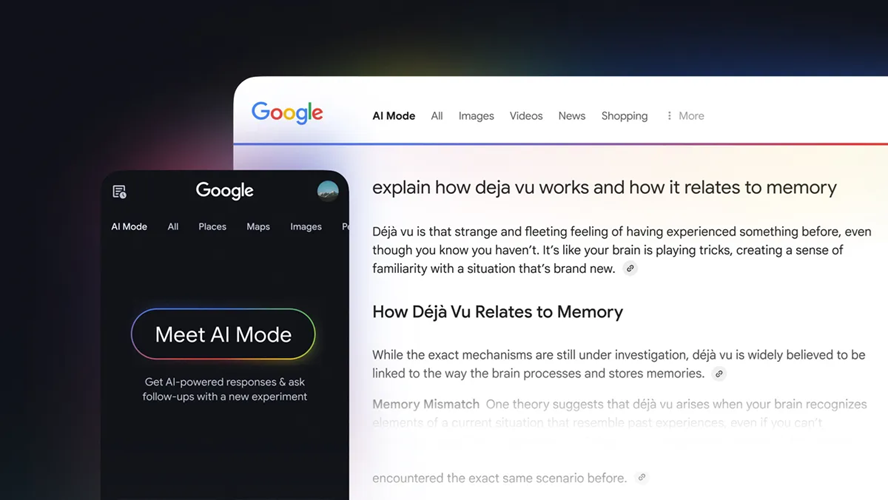
I think we are too late. We missed our opportunity to stop Google and LLMs from taking and repackaging our content — we should have stopped them when featured snippets came out.
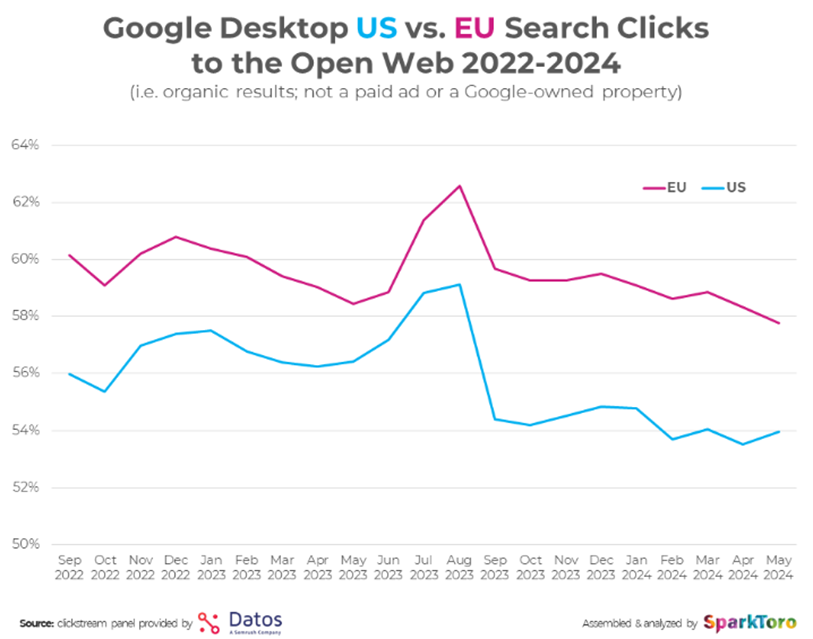
SparkToro's 2024 zero-click search study shows search clicks decreasing each month, and this will only get worse with Google's AI Overviews.
The EU is leading the charge with protecting content — the impact of GDPR is visible when comparing EU vs US click data. Australia would likely look similar.
SparkToro also looked at the number of searches per day across search engines and AI — Google still owns that space, but the world of search is changing and we as SEOs need to change with it.
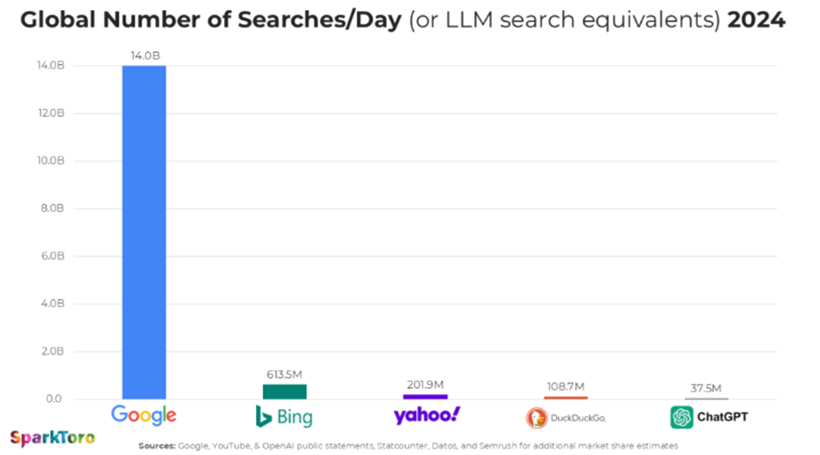
I regularly hear that older generations aren't using AI, but last Saturday my partner's mother mentioned how much she loves Gemini and Google AI Overviews. We're heading towards a zero-click world and we truly are optimising for bots. It's time to keep an eye on them.
Note: I'm a technical SEO, not an infrastructure expert — let me know if there's a clearer explanation for any of the server-side items above.